
Per action
Click, tap, attack, craft
Check the result of one deliberate action and any stat explicitly labeled per click or per hit.
Before you buy, write down the exact effect the upgrade claims to change. After one purchase, refresh the panel and compare that same unit—not whichever number is easiest to notice. A click upgrade calls for a per-click check; an automation upgrade calls for a production check; a Marketing label that changes demand still does not prove that sales increased. In our recorded examples, the relevant counters sometimes moved and sometimes stayed at the same rounded display.
This guide was assembled on October 18 from previously recorded, dated browser tests and player discussions. The four original cases below preserve their original setups. A separate October 18 recorded recheck was added on October 19 and is identified below; its starting state differs. These are individual observations, not a ranking, universal upgrade rule, timed earnings comparison, or proof of payback.

In a separate October 18 recording of the official Cookie Clicker browser game, version 2.058, our existing save owned one Cursor and one Grandma with no ordinary upgrade. Before buying Reinforced index finger for 100 cookies, Stats displayed 1 cookie per click and 1.1 cookies per second. After the single purchase and a panel refresh, the values were 2 per click and 1.2 per second. We bought nothing else between those readings.
We then clicked the large cookie once: Cookie clicks moved 118→119 and Hand-made cookies 118→120 after Stats updated. That is one action and two manually made cookies; subtracting a moving bank balance would mix in automatic production. The immediate, stale Stats panel was not used as the after reading.
Incremental games can display several numbers that change for different reasons. If you want to know what one purchase did, first choose the readout named by its description. Keep bank balance, current production and per-action strength separate; a moving balance alone may combine several causes.
Click, tap, attack, craft
Check the result of one deliberate action and any stat explicitly labeled per click or per hit.
Production / second
Read the displayed rate after the panel refreshes. It is not a stopwatch measurement of realized output.
Market indicators
Record demand separately from inventory sold, cash received, or profit.
Whole-number display
If a stated boost is small, an unchanged rounded number means only that this display did not visibly change.
These are separately dated tests; the values below preserve their original setup and limits. Open each report for its full procedure and state.
In version 2.058, one Cursor showed 1 cookie per click and 0.1 per second. After Reinforced index finger, the refreshed Stats showed 2 per click and 0.2 per second. One later big-cookie press moved Cookie clicks 25→26 and Hand-made cookies 25→27.
In that same sequential save, the first Grandma followed the finger upgrade. Total displayed production changed 0.2→1.2 per second while per-click stayed at 2. The study was not a matched alternate-save race.
At a displayed clip price of $0.24, one Marketing purchase moved Public Demand 33%→36% and Marketing Level 1→2. Sales, revenue and payback were not timed.
The Improved AutoClippers purchase confirmed a 25% boost after 750 operations were spent, while the sampled whole-number Clips per Second counter still displayed 1. No fractional or timed rate was measured.
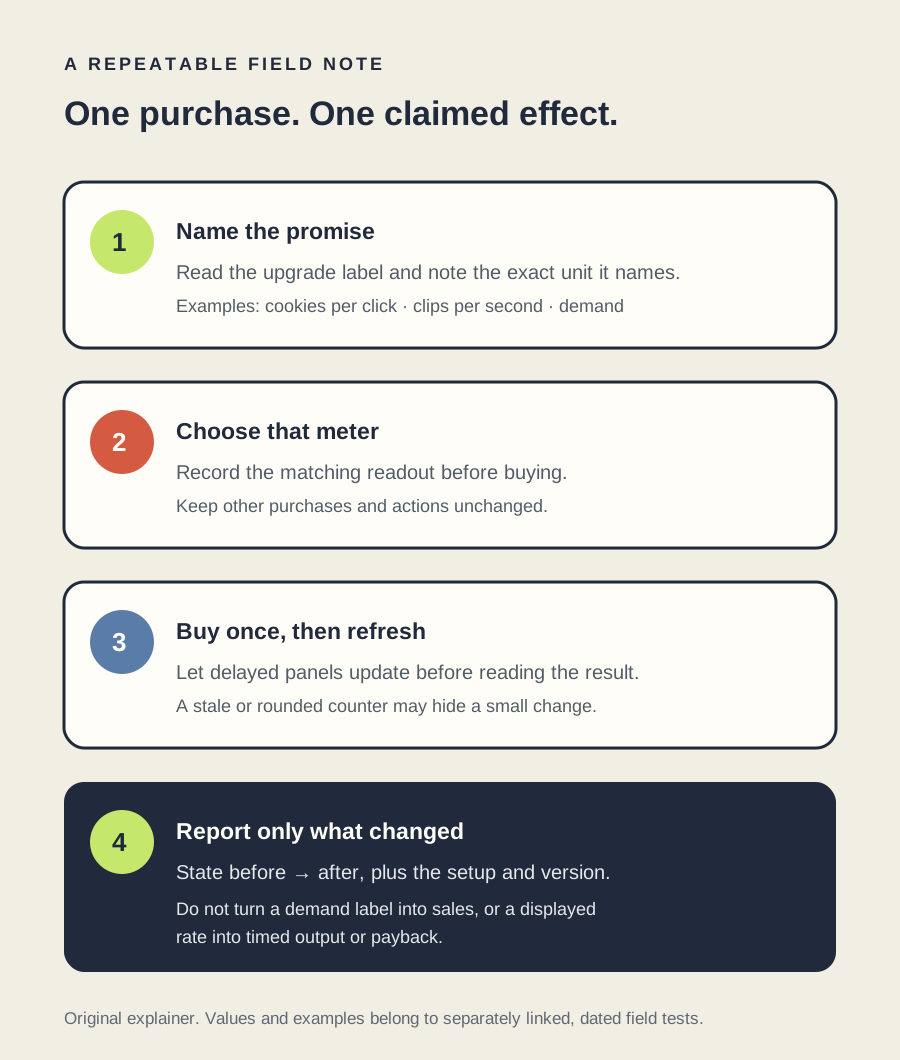
A single before-and-after observation cannot identify every hidden multiplier or prove an optimal route. A whole-number counter can hide smaller changes; demand can differ from realized sales; and a displayed per-second rate is not the same thing as output timed over a chosen interval. If the game changes other variables automatically, record them or stop short of attributing the difference to one purchase.
Player discussions show why upgrade effects can be hard to judge: commenters disagree about meaningful choices, quality-of-life effects and whether a benefit feels visible. See the recent skill-tree discussion and the upgrade-micromanagement discussion. Those are opinions about design, not evidence that any particular game behaves like the examples above.
For the broader tested route through one game's opening, see the Universal Paperclips beginner guide. For a specific early Cookie Clicker choice, see the finger-versus-Grandma report. These reports retain their own test dates and limits.